Blog

Archive for the ‘Statistics’ Category

Principal Components Regression: Part 2 – The Problem With Linear Regression

Thursday, March 4th, 2010

This is the second part in a three part series on PCR, the first article on the topic can be found here.

The Linear Regression Model

Multiple Linear Regression (MLR) is a common approach to modeling the relationship between one or two or more explanatory variables and a response variable by fitting a linear equation to observed data. First let’s set up some notation. I will be rather brief, assuming the audience is somewhat familiar with MLR.

In multiple linear regression it is assumed that a response variable, depends on k explanatory variables, , by way of a linear relationship:

The idea is to perform several observations of the response and explanatory variables and then to chose the linear coefficients which best fit the observed data.

Thus, a multiple linear regression model is:


In matrix notation we have

where

.

The solution for the coefficient vector which “best” fits the data is given by the so called “normal equations”

This is known as the least squares solution to the problem because it minimizes the sum of the squares of the errors.

Now, consider the following example in which

and

Solving this simple linear regression model using the normal equations yields

which is quite far off from the actual solution

The reason behind this is the fact that the matrix is ill conditioned. Since the second column of is approximately twice the first, the matrix is almost singular.

One solution to this problem would be to change the model. Since the second column is approximately twice the first, these two explanatory variables encode basically the same information, thus we could remove one of them from the model.
However, it is usually not so easy to identify the source of the bad conditioning as it is in this example.

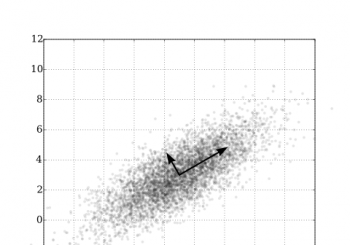
Another method for removing information from a model that is responsible for impreciseness in the least squares solution is offered by the technique of principal component regression (PCR). Henceforth we shall assume that the data in the matrix is centered. By this we mean that the mean of each explanatory variable has been subtracted from each column of X so that the explanatory variables all have mean zero. In particular this implies that the matrix is proportional to the covariance matrix for the explanatory variables.

Removing the Source of Imprecision

Let be an mxn matrix, and recall from the part 1 of this series that we can write as

where is a diagonal matrix containing the eigenvalues (in ascending order down the diagonal) of , and is orthogonal. The condition number for is just the absolute value of the ratio of the largest and smallest eigenvalues:

Thus we can see that if the smallest eigenvalue is much smaller than the largest eigenvalue, we get a very large condition number which implies a poorly conditioned matrix. The idea then is to remove these small eigenvalues from thus giving us an approximation to that is better conditioned. To this end, suppose that we wish to retain the r (r less than or equal to n) largest eigenvalues of in our approximation, and thus write

,

where

is an r x r diagonal matrix consisting of the r largest eigenvalues of , is a (n-r) x (n-r) diagonal matrix consisting of the remaining n – r eigenvalues of , and the n x n matrix is orthogonal with consisting of the first r columns of , and consisting of the remaining n – r columns of . Using this formulation we can write an approximation to using the r largest eigenvalues as

.

If we substitute this approximation into the normal equations 2, and do some simplification, we end up with the principal components estimator

.

While we could use equation 3 directly, it is usually not the best way to perform principal components regression. The next article in this series will illustrate an algorithm for PCR and implement it using the NMath libraries.

-Steve

  • Share/Bookmark

Principal Component Regression: Part 1 – The Magic of the SVD

Monday, February 8th, 2010

Introduction

This is the first part of a multi-part series on Principal Component Regression, or PCR for short. We will eventually end up with a computational algorithm for PCR and code it up using C# using the NMath libraries. PCR is a method for constructing a linear regression model in the case that we have a large number of predictor variables which are highly correlated. Of course, we don’t know exactly which variables are correlated, otherwise we’d just throw them out and perform a normal linear regression.

In order to understand what is going on in the PCR algorithm, we need to know a little bit about the SVD (Singular Value Decomposition). Understanding a bit about the SVD and it’s relationship to the eigenvalue decomposition will go a long way in understanding the PCR algorithm.

The Singular Value Decomposition

The SVD (Singular Value Decomposition) is one of the most revealing matrix decompositions in linear algebra. A bit expensive to compute, but the bounty of information it yields is awe inspiring. Understanding a little about the SVD will illuminate the Principal Components Regression (PCR) algorithm. The SVD may seem like a deep and mysterious thing, at least I thought it was until I read the chapters covering it in the book “Numerical Linear Algebra”, by Lloyd N. Trefethen, and David Bau, III, which I summarize below.
(more…)

  • Share/Bookmark

Savitzky-Golay Smoothing in C#

Monday, November 9th, 2009

Savitzky-Golay smoothing effectively removes local signal noise while preserving the shape of the signal. Commonly, it’s used as a preprocessing step with experimental data, especially spectrometry data, because of it’s effectiveness at removing random variation while minimally degrading the signal’s information content. Savitzky-Golay boils down to a fast (multi-core scaling) correlation operation, and therefore can be used in a real-time environment or on large data sets. If higher order information is needed from the signal, Savitzky-Golay can also provide high quality smoothed derivatives of a noisy signal.

Algorithm

Savitzky-Golay locally smooths a signal by fitting a polynomial, in a least squares sense, to a sliding window of data. The degree of the polynomial and the length of the sliding window are the filter’s two tuning parameters. If n is the degree of the polynomial that we are fitting, and k is the width of the sliding window, then


is needed for smoothing behavior (we must avoid an over-determined system). Typically n is 3 or 4, and k depends on the size in samples of the noisy features to be suppressed in your dataset.

For the case of n=0 the Savitzy-Golay filter degenerates to a moving average filter – which is good for removing white noise, but is poor for preserving peak shape (higher order moments). For n=1, the filter does a linear least-squares fit of the windowed data to a line. If n=k-1, the polynomial exactly fits data point in the window, and so no filtering takes place.

Once the polynomial is fit, then (typically) the center datapoint in this window is replaced by value of the polynomial at that location. The window then slides to the right one sample, and the process is repeated.

Savizky-Golay delivers the unexpected surprise that the polynomial fitting coefficients are constant for a given n and k. This means that once we fix n and k for our filter, the Savizky-Golay polynomial fitting coefficients are computed once during setup, and then used across the entire data set. This is why Savizky-Golay is a high performance correlation filter.

Comparison Example

The following three images show some real experimental data and a comparison of two filtering algorithms. The first image shows the raw data, the second image shows the effect of an averaging filter, and the last image demonstrates a Savitzky-Golay smoothing filter of length five.

current_raw_data

Raw Data

Averaging Filter, Length 5

Averaging Filter, Length 5

Savitzky-Golay Smoothing, Length = 5

Savitzky-Golay Smoothing, Length 5

The averaging filter introduces a large error into the location of the orange peak, whereas Savitzky-Golay removes the noise while maintaining the peak location. Computationally, they require identical effort.

NMath Stats Code Example

The Savitzky-Golay smoothing filter is implemented in the NMath-Stats package as a generalized correlation filter. Any filter coefficients can be used with this moving window filter, Savitzky-Golay are just one possibility. The moving window filter also does not require the filtering to take place in the center of the sliding window; so when specifying the window, two parameters are required: number to the left, and number to the right, of the filtered data point.

Here are the key software components.

  • MovingWindowFilter.
    SavitzkyGolayCoefficients(nLeft, nRight, PolyDeg)
  • MovingWindowFilter(nLeft, nRight, Coefficients[])
  • MovingWindowFilter.Filter(data, boundary options)


The first is a static function for generating the Savizky-Golay coefficients, the second is the filtering class that takes the generated coefficients in the constructor. The third is the method that actually does the filtering by running a cross-correlation between the data the the saved coefficients.

Below is a complete code example to copy and experiment with. Only three lines of code are needed to build the filter and do the filtering. The remaining code is for displaying results and building a synthetic noisy signal.

int nLeft = 2;
int nRight = 2;
int n = 3;
 
// Generate the coefficients.
DoubleVector c =
MovingWindowFilter.SavitzkyGolayCoefficients( nLeft, nRight, n );
 
// Build the filter of width: nLeft + nRight + 1
MovingWindowFilter filter =
  new MovingWindowFilter( nLeft, nRight, c );
Console.WriteLine( "Filter coeffs = " + filter.Coefficients );
 
// Generate a signal
DoubleVector x = new DoubleVector( 100, -5, .1 );
DoubleVector y = new DoubleVector( x.Length );
for ( int i = 0; i < x.Length; i++ )
{
  double a = x[i];
  y[i] = 0.03*Math.Pow(a, 3) + 0.2*Math.Pow(a, 2) -.22*a + 0.5;
}
Console.WriteLine( "Smoothed signal = " + y );
 
RandGenUniform rng = new RandGenUniform(-1, 1, 0x124 );
for ( int i = 0; i < y.Length; i++ )
{
  y[i] += rng.NextDouble();
}
Console.WriteLine( "x = " + x );
Console.WriteLine( "Noisy signal = " + y );
 
// Do the filtering.
DoubleVector z =
filter.Filter(y, MovingWindowFilter.BoundaryOption.PadWithZeros);
Console.WriteLine( "Signal filtered = " + z );

-Paul

Addendum – Savitzky-Golay Coefficients

If you want to quickly try out Savitzky-Golay smoothing without computing the coefficients, or just compare coefficients, here are some coefficients for a sliding window of length five. They also provide some insight into the relationship between the coefficients and the behavior of the filter.

Filter length = 5, nLeft = 2, nRight = 2.
Polynomial of order 0,
[ 0.2 0.2 0.2 0.2 0.2 ]  (averaging filter)
Polynomial of order 1,
[ 0.2 0.2 0.2 0.2 0.2 ]
Polynomial of order 2,
[ -0.0857142 0.3428571 0.4857142 0.3428571 -0.0857142 ]
Polynomial of order 3,
[ -0.0857142 0.3428571 0.4857142 0.3428571 -0.0857142 ]
Polynomial of order 4 and higher,
[ 0 0 1 0 0 ]  (as expected, no filtering here!)

Another Smoothing Example on Real Data

This is another example of Savitzky-Golay smoothing on some experimental data. If more smoothing was desired, a longer filtering window could have been used.

Savitzky-Golay Smoothing, Length = 5.

Savitzky-Golay Smoothing, Length = 5.

  • Share/Bookmark

Variance inflation factors

Wednesday, May 27th, 2009

A customer contacted us about computing “variance inflation factors”.

Wikipedia defines this as:

In statistics, the variance inflation factor (VIF) is a method of detecting the severity of multicollinearity. More precisely, the VIF is an index which measures how much the variance of a coefficient (square of the standard deviation) is increased because of collinearity. [Ref]

Here’s an implementation using CenterSpace’s NMath and NMath Stats libraries.

// Returns all the variance inflation factors
private static DoubleVector Vif( LinearRegression lr )
{
  // iterate through predictors and find variance
  // inflation factor for each
  DoubleVector factors =
    new DoubleVector( lr.NumberOfPredictors );
  for (int i = 0; i < lr.NumberOfPredictors; i++)
  {
  factors[i] = Vif( lr, i );
  }
  return factors;
}

// Returns a single variance inflation factor
private static double Vif( LinearRegression lr, int i )
{
  // remove predictor, change observation
  LinearRegression lr2 = (LinearRegression)lr.Clone();
  lr2.RemovePredictor( i );
  lr2.SetRegressionData( lr2.PredictorMatrix,
    lr.PredictorMatrix.Col( i ), true );

  // calculate variance inflation factor
  LinearRegressionAnova anova =
    new LinearRegressionAnova( lr2 );

  // return factor
  return 1.0 / (1.0 - anova.RSquared);
}

And here’s an example using these functions:

DoubleMatrix independent = new DoubleMatrix(
  "30x3[0.270 78 41 0.282 79 56 0.277 81 63 " +
       "0.280 80 68 0.272 76 69 0.262 78 65 " +
       "0.275 82 61 0.267 79 47 0.265 76 32 " +
       "0.277 79 24 0.282 82 28 0.270 85 26 " +
       "0.272 86 32 0.287 83 40 0.277 84 55 " +
       "0.287 82 63 0.280 80 72 0.277 78 72 " +
       "0.277 84 67 0.277 86 60 0.292 85 44 " +
       "0.287 87 40 0.277 94 32 0.285 92 27 " +
       "0.282 95 28 0.265 96 33 0.265 94 41 " +
       "0.265 96 52 0.268 91 64 0.260 90 71]" );

DoubleVector dependent =
  new DoubleVector( "0.386 0.374 0.393 0.425 " +
  "0.406 0.344 0.327 0.288 0.269 0.256 0.286 " +
  "0.298 0.329 0.318 0.381 0.381 0.470 0.443 " +
  "0.386 0.342 0.319 0.307 0.284 0.326 0.309 " +
  "0.359 0.376 0.416 0.437 0.548" );

LinearRegression regression =
  new LinearRegression( independent, dependent, true );
Console.WriteLine( "Is good? " + regression.IsGood );
LinearRegressionAnova anova =
  new LinearRegressionAnova( regression );
Console.WriteLine( "variance: " + regression.Variance );
Console.WriteLine( "r-squared: " + anova.RSquared );
DoubleVector vif = Vif( regression );
Console.WriteLine( "variance inflation factors: " + vif );

-Trevor

Note: This functionality is now in NMath Stats.

  • Share/Bookmark

Non-negative Matrix Factorization in NMath, Part 1

Friday, January 9th, 2009

A couple of years ago, we were asked by a customer to provide an implementation of an algorithm called Non-negative Matrix Factorization (NMF). We did a basic implementation, which we later included in our NMath Stats library. I kind of forgot about it until we recently heard from a prospective NMath customer who wanted to use NMF for grouping, or clustering. Talking with this customer rekindled my interest in NMF and we decided to provide additional functionality built on the existing NMF code to facilitate using the NMF for clustering.

This entry will proceed in three parts. The first will give a brief introduction to NMF and its uses, the second will briefly cover how to compute the factorization, and the third will cover how NMF can be used for clustering.

The Non-negative Matrix Factorization

Given a non-negative m-row by n-column matrix A, a non-negative matrix factorization of A is a non-negative n-row by k-column matrix W and a non-negative k-row by m-column matrix H whose product approximates the matrix A.

A ~ WH

The non-negativity of the elements of W and H are crucial, and are what make this problem a bit different. The entries of A usually represent some quantity for which negative numbers make no sense. For instance, the numbers, aij, in A might be counts of the ith term in the jth document, or the ith pixel value in the jth image.

So, why is this useful? Of course, it depends on the particular application, but the basic idea is dimension reduction. In general, NMF is used only when the matrix A is large. In the image pixel value example, where each column of the matrix A contains the pixel values of a particular image, the number of rows will be quite large, as may be the number of columns. When we do an NMF of A and make k much smaller than the number of rows or columns in A, the factorization yields a representation of each column of A as a linear combination of the k columns of W, with the coefficients coming from H.

For example, suppose I have 300 facial images (pictures of people’s faces). Each image is encoded as 50,000 pixel values. I arrange these into a 50,000 x 300 matrix A. 50,000 is a fairly large number, and if I am looking at each column of A as a vector, it’s a vector with 50,000 coordinates. Let’s do a NMF on A with k = 7. Now, each image (column in A) can be approximated by a linear combination of these 7 basis images. If the approximation is good, these 7 basis images, which are the columns of W, must represent a good chunk of the information in the original 300 images, and we have reduced the dimension of the space we are working in from 50,000 down to 7. Indeed, in this particular application it was found that the columns of W represented facial characteristics

  • Share/Bookmark